



Avoid Common SciENcv Validation Errors for NIH Submissions
Pre-Award
Jul 13, 2026When using SciENcv-generated documents for NIH proposals, we've identified two common issues that can cause eRA Commons validation errors.
1. Do not rename the downloaded PDF.
Always upload the SciENcv-generated PDF exactly as it was downloaded. If the filename is changed in any way, for example, from cpos12345.pdf to cpos12345(1).pdf by your operating system or to another filename, the document may fail NIH validation because it is treated as corrupted.
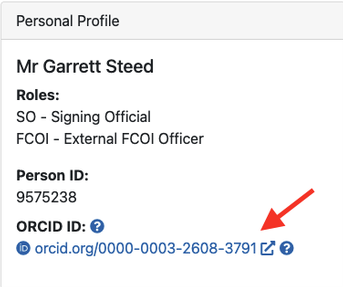
2. Verify your ORCID iD is linked to your eRA Commons profile.
If your ORCID iD is not displayed in your eRA Commons Personal Profile (as shown in the example below), NIH may generate the same validation error seen with renamed or corrupted SciENcv documents. Before submitting your application, confirm that your ORCID iD is linked in eRA Commons and that all SciENcv-generated PDFs retain their original filenames.
Quick Checklist
Before submitting your NIH proposal, verify that:
- The SciENcv PDF filename has not been renamed after download.
- Your eRA Commons profile is linked to your ORCID iD.
Correcting these two issues resolves the vast majority of SciENcv validation errors encountered during proposal submission.
For more from the Pre-Award team, click here.